Bag (BitBag): Bitcoin Portfolio Monitor — One  Every currency.
Track your Bitcoin net worth in real time across USD, EUR, GBP and more. New in 2.0: Tor built in on Android and iOS, a Pro feature with nothing else to install.
Everything you need.
Nothing you don't.
Built for Bitcoiners who want a clean, fast, and private way to track their holdings.
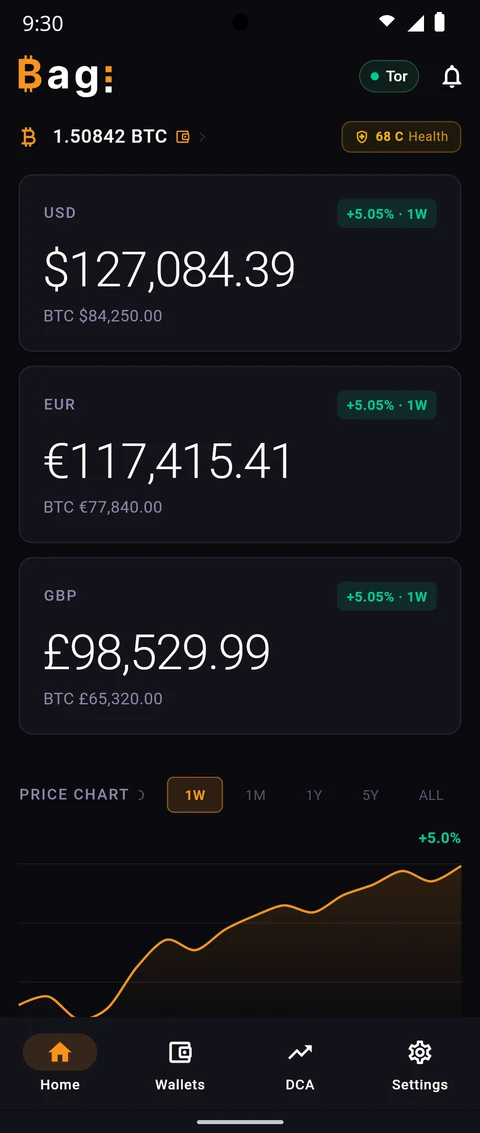
Real-Time Tracking
Live Bitcoin prices refreshed automatically. Always know your exact net worth, updated to the minute.
Privacy First
No account, no sign-up, no ads, no analytics. Your holdings stay on your device, never on our servers.
Home Screen Widget
A Bitcoin widget with price, chart and net worth. It shows when it last updated, and says "Paused" instead of passing off old prices as fresh.
Multi-Currency
View your Bitcoin value in up to three currencies at once: USD, EUR, GBP and many more, now including the Ukrainian hryvnia.
Price Charts
Visualise Bitcoin price history over 1D, 1W, 1M, 1Y, 5Y and all-time spans to track market movement.
DCA Tracker
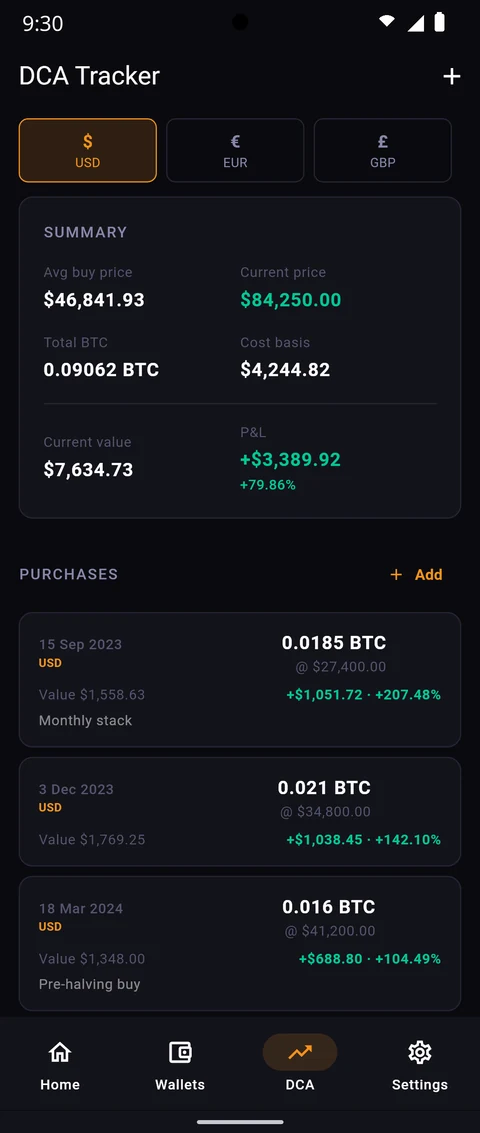
Log every purchase and see your average buy price, cost basis and profit or loss. The log is encrypted on your device.
Lightning or on-chain, no account. Or buy it in the app on Google Play and the App Store. The key works in every version of Bag (App Store and Google Play from 2.0.1).
Tor Built In
Wallet and price lookups go through Tor inside Bag, on Android and iOS. No other app to install.
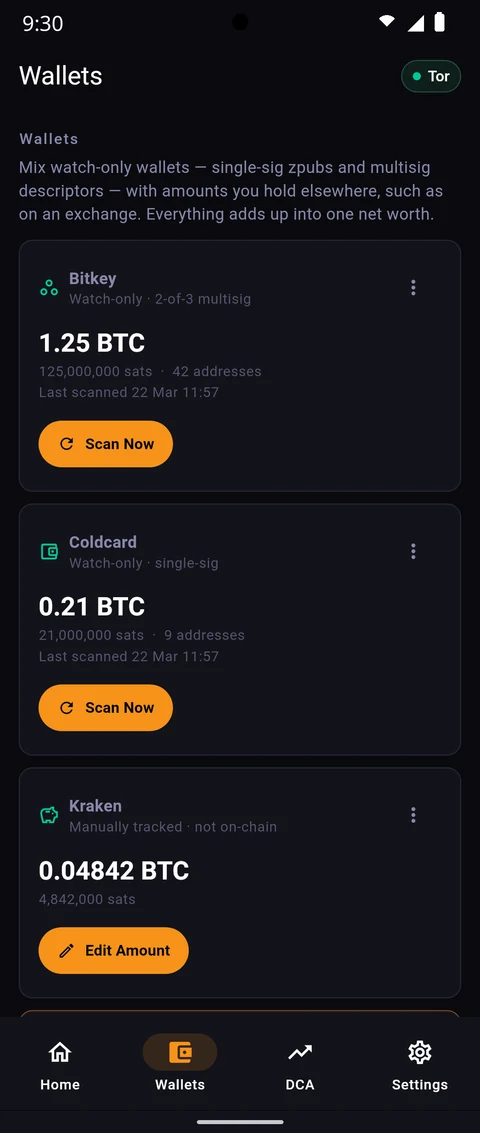
Watch-Only Wallets
Single-sig, multisig and Bitkey, from an xpub/zpub or an output descriptor. Read-only: Bag can never spend.
The Wallets Tab
One tab for your watch-only wallets, typed-in balances for coins on an exchange, and the Tor, proxy and node settings.
Custom Proxy
Route Bag through your own SOCKS5 or HTTP proxy, with optional credentials. The settings are stored encrypted.
Your Own Node
Point ₿ag at your own Esplora server, including a .onion address, which is only ever contacted over Tor or a SOCKS5 proxy.
Fails Closed
If Tor or your proxy is down, Bag waits and tells you. It never quietly falls back to a direct connection. A pill on the Home screen shows Tor, Proxy or Direct.
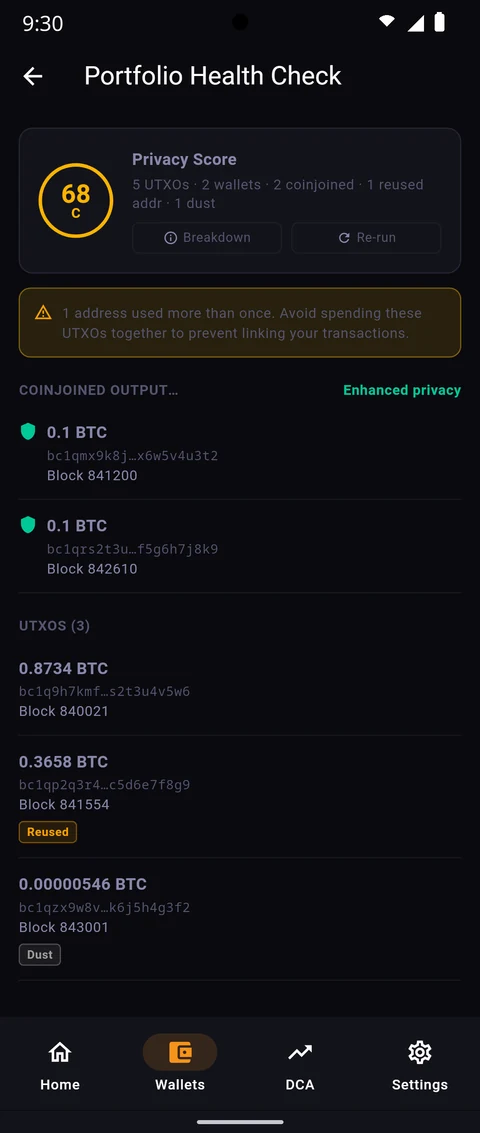
Bitcoin Health Check
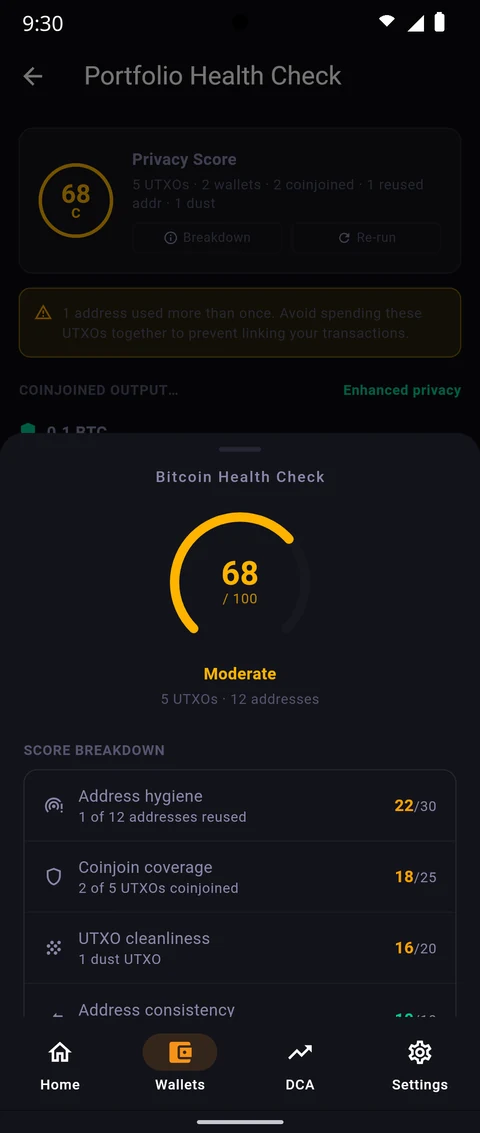
A privacy score for your coins from 0 to 100: address reuse, coinjoin coverage and UTXO hygiene, with what to fix first.
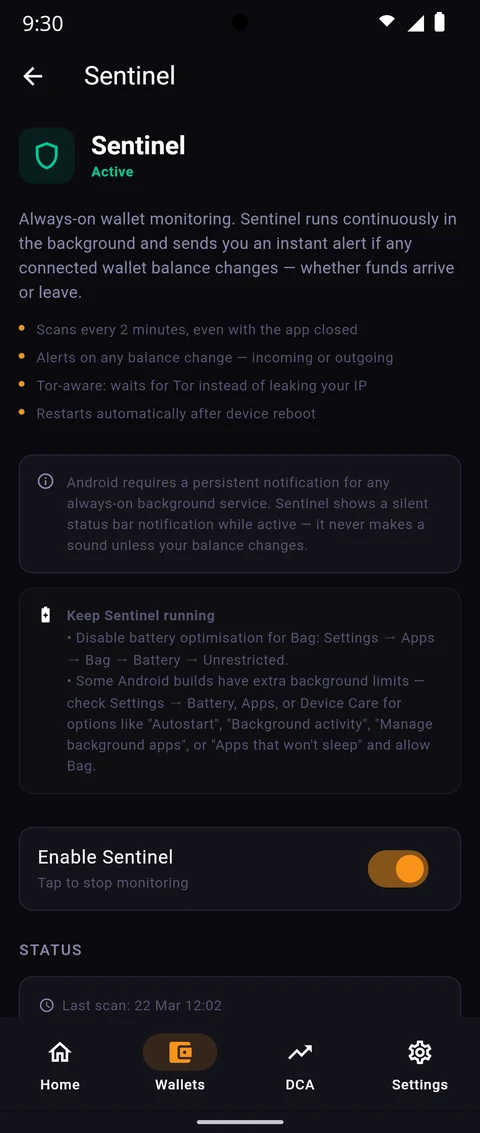
Sentinel
Always-on monitoring on Android: a notification the moment a payment touches one of your wallets. On iPhone, Sentinel Lite checks when iOS lets Bag run.
Fee Estimates & Alerts
Mempool fees on the home screen and the widget, and a ping when they reach your sat/vB target.
Your keys.
Your data.
₿ag is built privacy-first. Watch your cold storage wallet without exposing your seed phrase, and route every lookup through Tor, now built into the app, so the block explorer never sees your IP next to your addresses.
- Watch-only wallets from a zpub or a multisig descriptor (Bitkey, Sparrow, Nunchuk). Your keys never leave your devicePRO
- Tor built in on Android and iOS: nothing else to installPRO
- Fails closed: if Tor or your proxy is down, nothing goes out directlyPRO
- Your own SOCKS5 or HTTP proxy, or your own Esplora node, including .onionPRO
- Sentinel notifies you the moment a payment touches a wallet on Android; on iPhone, Sentinel Lite checks when iOS allowsPRO
- Bitcoin Health Check scores the privacy of your coins from 0 to 100PRO
Stack sats.
Track gains.
Log every Bitcoin purchase and instantly see your average buy price, total cost basis, and unrealised P&L — in your currency of choice. No spreadsheet needed.
- Log every Bitcoin purchase with price, date, and currencyFREE
- Track your average buy price and total cost basis automaticallyFREE
- See unrealised P&L in USD, EUR, or GBP at a glanceFREE
- Multi-currency DCA entries — mix GBP, USD, EUR in one portfolioFREE
- Optional notes per purchase — "buy the dip!" and moreFREE
How to do it with ₿ag
Step-by-step guides for watch-only wallets, the widget, DCA tracking and what changed in 2.0.
Frequently asked questions
Is Bag free?
Yes. Your holdings, net worth in up to 3 currencies, price charts, the DCA tracker and the home screen widget are free, with no ads. Bag Pro is a one-time $7.99 purchase with no subscription. It adds watch-only wallets, built-in Tor, your own node or proxy, the Bitcoin Health Check, fee alerts and Sentinel (Sentinel Lite on iPhone).
Do I need an account to use Bag?
No. There is no account, no sign-up, no analytics and no tracking. Your holdings stay on your device, stored encrypted, and are never sent to our servers.
Privacy policy →Can Bag spend or move my bitcoin?
No. Bag is watch-only. It reads a balance from a public key (zpub) or an output descriptor and never asks for a seed phrase or a private key, so it cannot sign or send anything.
Check an xpub or zpub balance privately →Which wallets can Bag watch?
With Pro, any single-sig wallet that exports a zpub, and multisig wallets from an output descriptor, including Sparrow, Nunchuk and Bitkey 2-of-3 exports. You can also type in a balance for coins held on an exchange.
Watch-only multisig from an output descriptor →Does Bag work with Tor?
Yes. From version 2.0 Tor is built into Bag on Android and iOS, so there is no other app to install. It is a Pro feature. If Tor cannot connect, Bag waits and tells you instead of falling back to a direct connection.
What’s new in Bag 2.0 →Is there a Bitcoin widget?
Yes, and it is free. The home screen widget shows the Bitcoin price, a chart and your net worth on Android and iOS, along with when it last updated.
Bitcoin price and net worth widget →Which currencies does Bag support?
Bag shows the Bitcoin price and your net worth in 31 currencies, including USD, EUR, GBP, JPY, CAD, AUD, CHF and UAH, plus gold. You pick up to three to see side by side.
Bitcoin DCA tracker and net worth calculator →Can I buy Pro with Bitcoin?
Yes. Buy Pro with Bitcoin, Lightning or on-chain, at bitbag.app/pro. You get a key that unlocks Pro in every version of Bag: App Store and Google Play from 2.0.1, F-Droid and the GitHub APK in any version. Paste it in the Pro screen under Already have a key?. Lost it? Get it back at bitbag.app/recover with your payment ID or Lightning invoice.
Where can I get Bag, and is it open source?
Bag is on Google Play, the App Store and F-Droid, and as a signed APK on GitHub. It needs Android 7.0 or iOS 15, or later. The app is open source under the GPL-3.0 licence.
Available on Android & iOS
Free to download. No account required. Pro is a one-time $7.99 unlock, bought in the app on Google Play and the App Store, or with Bitcoin at bitbag.app/pro. The key works in every version of Bag (App Store and Google Play from 2.0.1). Requires Android 7.0 or iOS 15, or later.
On a computer? Scan with your phone:
Open source. No middleman.
F-Droid₿ag is available on the official F-Droid repository — free, open source, no Google Services required. Then unlock Pro by paying with Bitcoin at bitbag.app/pro, and paste the key in Bag. No account. No IAP. No app store cut.
Direct APK download
GitHub ReleasesEvery release is published on GitHub with a PGP-signed APK alongside its .asc signature file. Download both and verify before installing.
Android requires enabling Install from unknown sources in Settings → Apps to install APKs outside of Google Play.
Verify Your Download
Every ₿ag APK is signed with the key below. Verify the signature before installing to confirm the file is genuine and unmodified.
6D8D 9402 7765 B0FE 045A B5DC 7B44 BFB4 CFF0 6540RSA 4096 • Used to sign all official ₿ag releases • Download .asc signature from GitHub Releases
-----BEGIN PGP PUBLIC KEY BLOCK-----

mQINBGm+vwYBEADi2I3hZfxUTeN00I00usF5TUH9jdgMkowkFNNgcaYDo5qfg6U5
s7n7brX9SA947GU/DGX6YW/tH54jK6VH3wPaG5Fkz0fjLdwy+29yY5XVpfxKmw0x
6hJPKcGyI+bHK+K+6uAlvqtflSa6DxCfCQKrGaGQ7aQ84Nxp3h1MGLQltbgYlpbs
ic4bSlw7Oo5kES7X9GE1xMQ8u3LIzSdN51QRxS9Ci3S4yJwK1UMWfD0pIM/AmjaY
r+8zpSuRcQpe5APL6+i+27VBF8EpGVxmA/9pRB/4uhWVev3VNhYS6AXwVcK0G/4J
F7ZKXg0VqE+rr0qbhdOFn/9enoUXTJuINtIM+dam+5CZGc55iU6j0kSu7A4JVjV3
T0YH/H+ojvQeGsKvX5ydyYW3Yxztli/C0upUo0wJw+7fvh7IND9h6Sm121xrLrpE
8sDbDtMgVFMZOyGEAaNd51f47oSb2pycBSs8KbmiuhnDpcGbFUH810X5uc1kkj2C
VBsKZMohKDa/ixctWOeBvIg5ADb5Ku/HC7QUrrCZWHCcqY79EwvnhD4iLMXz0P2T
x/v09iWBwwt4yJiRlCq7UBopDsZ7l1W+lCZMrbFue9tT9DvMUrcJGVr6zy31Mu4f
82PimfQ7y3pFvlPxC6SDCRVS/i92MpEqJLJ2x/BjZ6OtXwbKNerISZIM2wARAQAB
tCJCYWcgUmVsZWFzZXMgPHJlbGVhc2VzQGJpdGJhZy5hcHA+iQJSBBMBCgA8FiEE
bY2UAndlsP4EWrXce0S/tM/wZUAFAmm+vwYDGy8EBQsJCAcCAiICBhUKCQgLAgQW
AgMBAh4HAheAAAoJEHtEv7TP8GVALA8QAIVOfDt7gdGLvsIt1QPIPDqv/WfvgG7a
3UBgiu2gA6zixBg8gBfeuNMAcAnFLOnzu+svnjnzN2vFD3F1qFCKxCi/Ndi9ccdO
DYEC89+5XJiW2IkRgFvHJDAUpXJOnTXntE9RXFn+o3V/tBkHTVBFn9bCGdYZFHjQ
80m1kY41UskZhCkffs9heie763/zP8/gWiqeYe7JIOOJYFv6JElaZ8nnzp2Di+/W
SNqruez7TzlqY1ZVL9eUY3ItBY9w6Nlf0dn0ioXh2tU6RHiEPt1rbKSwZF8DdpaC
NtS/vQKNJwhfkMn1t4+hbgh93WPOC7fvLFB2Zif1UZtPx+0jRiidecQcKLypAfX4
tPgNpTVC8mrIhVb3g+RcmlzsVDi9n1RuEnTYtx2HF38ZmQMYOav3spXV93K89xng
bJnlbsQXnsxAeT0GQhdJ8nGDGL1WEAdiV2vHGk0ZXuY6YxpBpH8tU0CU+CiSPTOR
AYMxg7besrEletITzCsV4etl7OC78EBSsNQIdFNCWpPEWMn4WH1MkfTVqFaVsc5R
Ci11KOeFE/WMZ9xmbhP+ZzlY+7ZSkjvFjKcEdrywuct2rxplbMYpDQg3+MN0sej/
HGBGNK0Pdx9j4tw0+AApDXpcjy655rHABGqFTN8kaob6Z6+dj4LVvUufdUgM1WI+
eLnF1/o2oBUAuQINBGm+vwYBEADWFK/UDUIfIbDQoA+ha2wKemnh6eQQIWxPFdUa
U3vPoTCztC6jTMTPnxkzWG41Cwwi41dVSZIADOh9a5ckUTJZnxQKAzdXUMp9+reI
gTfwQ8sMGpOsUgc7ApKIw9FaWB0xhJ8c3zxYBCgmDXQOsEegNwIPGE6mxPt3fEuB
UZ6lIezbc9RHeHU69+ynfnJOcmPKaHtarVKWpsew6GZLKk7IjoCImITaaa95wuyc
+Avwh+i70JAn09MoglVBvUjJL4AaW9kPZfNsxx+UTK5fQmhRFzMgOD8thZMVCoaM
Wu9gsE7iHXbwKCg/AT1L8PqG21yinIdng8B9c9aKgLAIZL5GbYlIvijtMt9Oul6i
PY7ISe0B8ltmg+2gVXpdN2iLVSUMieSEPA0MpP/mXV55Hz0hDGiYxLe2uipdQ6XC
AII6hD5Fx/19oderc5su8ClP7B3BLt8f5CfbWD2+GDqDvvAsqQyPMFSDW9iaZ2vq
EvNlvo5cJ84fT7uGMGgG69TanXbK0aqSaK/XoX8rO8GccMD0wiPrv9tONaCFa5Bw
MPnGJ7kbkPaHX6uBMxTryE397Y5J7oa/zNJLdRzd+VeWshoIhID96YUMtOZ0NH7N
K9TuBfElmkduYaS4K/1pkgzUPfJc97NsTMU5XTtYrsIaCTyJkyN2pjGPbDtlOq6X
K2rG4QARAQABiQRsBBgBCgAgFiEEbY2UAndlsP4EWrXce0S/tM/wZUAFAmm+vwYC
Gy4CQAkQe0S/tM/wZUDBdCAEGQEKAB0WIQRLu0Y58KvYrq6/tZd8zHtQZHXi6QUC
ab6/BgAKCRB8zHtQZHXi6WMMEACAkoAK3rqkvHWIK23yQuGw4z3s/W98FzfK4Vh5
DhtsLLzYUCI2EDUnBVRevnndxz8B0DNV7zLAykfAzMFOcY5S2d3iafkesxbAsWUW
Aag59mF/mPzEBtridDpo5SFL4aY85G2qXBQtw0nYcg8JVFsDk6D487z0SuU8xYlY
4ka7Nrq/enrGC2csnIDOxHQPJTkUl3NskaZihx3QaVu00eRzb5hJN3PsixTu6Wy2
F2x42yuh/AULtok3RXUO1Uw2IUw9Thc6rtdW2BGmreHrK7q2TaA34bhPY1KNdnHw
EB/tL0iJ9BWQ+QX6nxpY8ax6XmqxHO/e/v4WekkEBzcFjcfEEFQuJ8ybceZa5P9T
5JKX7gat7z2lUPVb/nI95Nc7TH6mSyKX6VSPkFTSGH1Vf9NseVRynfEYQ9L6/ujR
qJmoK8J+t5d9F8UzVK5rC26FbhbVmiROUqMJ96YQN7CGdmCqnzo/3eIoSyrtxrSx
pOPOGdL6/ajYdWjbX3BxOgsy+NuyxyWNTPH/02QZM3C3h7vdrdJ6hpquK85/5PtX
tkH4yVSYxBFKlcLWE/SPYLO+U7+GIlwdpk33kAuOJxYZmdXMq1h7q9yusFrqpwhM
7GCJyBqWbIw+XUlPoF1OoSd8JTCO21r6JXYS60QAOaQE2vFkD/385gGk4frz6cEW
CJatU+VKEACwYgaEiAvcl7C0U8UBbMkdgncETqBdLzsOFzkXcudzGqcypKBgP/rk
YIP+YTVN2JMcO80XMOClUxhK2vzUwD362pzOfIGr1r/8yy+pWHZqunXbdiBX8kUr
qHWDE6z4eCp63g2ytAxKWAYxd8Pqw1DfpMVFgasLTAu8DK76egtye6Tl27Wcscv/
j4dPag2LUDmOeIIA2KtpTUdo3kLektmF9BjO04LeoYl9t0UEF3LFbP3cpnSyLVPn
PzwsINxAeYD9wBGC0v5R0qOJ117qHo50aChRlpi59/TwtL7lcnvr0Uo8vMoemlq6
WqO0QwCKuL/Zr2G2QX11/vaJNwF0R8YGyCCLmOvuuku+RLtbH/wv5qPdiS9s5E8V
wHNs7CfKTxPQqh9ykQI6+gQZBP3hSY9iteCZT+h5Ou/9aURIB9cSVMamgjkJ8/l6
YuGJ1qb0Leq2etaKHAkwEacoEdaN8CVn4eS/+23mSOPg9wyI5YiPN80CnfqVefeD
vc/80CX4oRagPskNm7NrrAUI99w5BHqYFZPNLnt8t3o3F8HrIL57NESFmbEvFGSl
gWXljWFVglADcAxlFuPIAe1r7+U8+R3DbBh2CPlhBwtirSAA12JzY2ov8reZ4Nv5
Ic+paLQGn8i0XZlHaZNfheN1cOlgbjYg/x/VJIfYBobFM/jRIqVajg==
=+X+U
-----END PGP PUBLIC KEY BLOCK-----
GPG is usually pre-installed. If not, install it with your package manager.
sudo apt install gnupg   # Debian/Ubuntu
sudo dnf install gnupg   # Fedora/RHEL
Import the ₿ag public key from the key block above.
gpg --import bag-signing-key.asc
Download both files from GitHub Releases into the same directory.
wget "https://github.com/UXAVIA/bag/releases/download/v2.0.1/bag-v2.0.1.apk"
wget "https://github.com/UXAVIA/bag/releases/download/v2.0.1/bag-v2.0.1.apk.asc"
Run GPG verify and confirm you see "Good signature".
gpg --verify "bag-v2.0.1.apk.asc" "bag-v2.0.1.apk"
Bad signature means the file was tampered with or is from a different source. Do not install it.